KN-BTPMC-202M
- DIN-rail mounting
- Extensive management
- Copper ports: 2 x 10/100/1000, RJ45
- Copper ports with PoE up to PoE++ 90W, total 180W
- Fibre optic ports: 2 x 100/1000 SFP
- Power supply: 48–56 VDC, redundant
- Extended temperature range
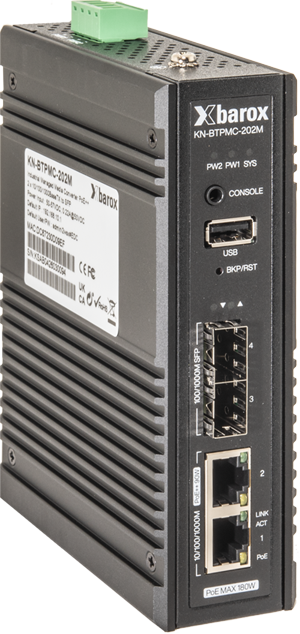
This managed industrial media converter was specifically designed for high-data-load applications, such as Video over IP or video streaming. Its compact design, wide temperature range, and high flexibility make this media converter ideal for remote locations. The media converter features two 100/1000FX SFP optical ports and two 10/100/1000TX copper ports. Both copper ports support PoE in accordance with 802.3af/at/bt up to 90W per port. A maximum of 180W of PoE power can be delivered across both ports. The extensive management functions enable a very high level of security and efficient network configuration.
Product information
Short description
Industrial managed media converter with PoE++ for 2 x 10/100/1000BaseTX to 2 SFP
Special features for video networks
The media converter continuously monitors PoE-powered cameras. If a camera fails, the media converter automatically restarts the camera. At the same time, the media converter sends an SNMP message.
Active and graphical monitoring of the PoE power supply
If a defective camera, for example, demands too much power from the media converter, the media converter will trigger an alarm via SNMP. The PoE power is continuously displayed.
Active management of PoE power
When the media converter is started up, the individual PoE ports can be started up in a delayed manner in order to prevent overloading of the PoE power supply units.
Jumbo Frames also at 100 Mbit/s
Jumbo Frames up to 10'240Bytes are also supported at 100 Mbit/s.
Special features
The media converter has extensive security features. For example, the ACL not only allows the media converter itself to protect traffic on the network.
System notes
The Media Converter supports PTP, precision time protocol according to IEEE1588 v2 and IEC 61588, a feature used in industrial automation, professional audio-video applications for audio-video bridging and telecommunications, among others.
Installation method
DIN-rail mounting
Ventilation
Fanless
Technical data
Maximum PoE for all ports: 180W
We recommend the use of our barox SFPs.
The compatibility of our devices with SFPs of other brands is not tested and not guaranteed by us.
1x USB-B socket, for firmware, configuration, logs
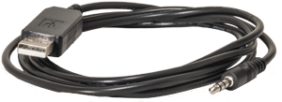
The adapter cable from jack to USB-A must be ordered separately
redundant
max. 200W with max. PoE
Net weight: 0.74 kg
PoE Monitoring
PoE Scheduling
PoE Priority
PD Alive Check (automatic reboot of end devices)
Port link state
Port speed
Port duplex
Port auto negotiation
Port flow control
Port MDI/MDIX
Speed
Duplex
Flow Control
Tx and Rx in Bytes
PoE status
ERPS, Ethernet Ring Protection Switching
Supports up to 4K VLANs simultaneously (out of 4096 VLAN IDs)
Port-based VLAN
A port member of a VLAN can be isolated to other isolated ports of the same VLAN and private VLANs.
Private VLAN edge (PVE).
Private VLANs are based on the source port mask and there are no connections to VLANs. This means that VLAN IDs and private VLAN IDs can be identical.
Voice VLAN
The Voice VLAN feature allows voice traffic to be forwarded on the Voice VLAN.
Guest VLAN
The IEEE 802.1X Guest VLAN feature allows a guest VLAN to be configured for each 802.1X port on the device to provide restricted services to non-802.1X compliant clients.
Q-in-Q (double tag) VLAN
This can be used to set specific requirements for VLAN IDs and the number of VLANs to support.
802.1v protocol VLAN
Classifying multiple protocols into a single VLAN often forces VLAN boundaries that are inappropriate for some of the protocols. This requires the presence of a non-standard entity that forwards frames containing the protocols for which the VLAN boundaries are unsuitable between VLANs.
MAC-based VLAN
The MAC-based VLAN feature allows incoming untagged packets to be assigned to a VLAN, classifying traffic based on the source MAC address of the packet.
IP subnet-based VLAN
In an IP subnet-based VLAN, all end workstations in an IP subnet are assigned to the same VLAN. In this VLAN, users can move their workstations without having to reconfigure their network addresses.
Management VLAN
Management VLAN is used to manage the switch from a remote location using protocols such as Telnet, SSH, SNMP, Syslog, and so on.
RADIUS
TACACS+
SSL / SSH
Firmware (FW-Download)
You need an account to download the firmware. Please log in or register. Registration must be activated by us.
Software (SW-Download)
You need an account to download the software. Please log in or register. The registration must be activated by us.

Complementary products
-
Compare
KN-CONSCAB
Accessories -
Compare
AC-SFP-BIA-FXME
SFP -
Compare
AC-SFP-BIA-FXSE
SFP -
Compare
AC-SFP-BIA-LXE
SFP -
Compare
AC-SFP-BIA-SXE
SFP -
Compare
AC-SFP-BIB-FXME
SFP -
Compare
AC-SFP-BIB-FXSE
SFP -
Compare
AC-SFP-BIB-LXE
SFP -
Compare
AC-SFP-BIB-SXE
SFP -
Compare
AC-SFP-FXMME
SFP -
Compare
AC-SFP-FXSME
SFP -
Compare
AC-SFP-LX-E-10
SFP -
Compare
AC-SFP-LX-E-20
SFP -
Compare
AC-SFP-LX-E-40
SFP -
Compare
AC-SFP-LX-E-70
SFP -
Compare
AC-SFP-SX-E
SFP -
Compare
AC-SFP-SXOM3-E
SFP